How fraudulent AWS accounts feed a Claude distillation market: reverse-engineering Kiro-account-manager
A seller in a Chinese-language Telegram channel offers Claude access at six cents on the dollar. Behind prices like that is a supply chain of fraudulently created accounts, and in those channels I found one example of how those accounts can be sourced: an open-source tool that mass-creates free AWS Builder ID accounts by forging Amazon’s anti-bot fingerprint. I investigate how it works and what defenders can learn from it.
TL;DR
- I reverse-engineer ‘Kiro-account-manager’, an open-source desktop tool that mass-creates free AWS Builder ID accounts that give access to Claude through Kiro IDE.
- Account creation is automated without a browser: it forges the browser fingerprint Amazon’s bot checks expect.
- It bundles the accounts behind one local proxy, creating high-volume free Claude API access.
- The account type this tool produces is sold in Chinese-language Telegram channels at a fraction of Anthropic’s rate, openly marketed as distillation-capable.
- I show how it works, how its randomized fingerprints can help defenders catch it, and the wider pattern it belongs to.
Why this matters to detection teams
For AI products like Kiro, an account’s free tier is backed by a frontier model: Kiro is Amazon’s IDE, and a model behind it is Anthropic’s Claude. This gives attackers a strong economic incentive to extract that value. Mass-created free accounts enable multiple types of abuse:
- Bypassing usage limits: Pooling many accounts bypasses the per-account limits, for cheap, high-volume access.
- Relays and discounted resale: That access is resold as an API in an underground market of relays, at a fraction of the official price.
- Model distillation: High-volume access lets a buyer harvest a model’s answers and the reasoning it shows to train a model of their own.
Distillation lets a competitor acquire an AI lab’s capabilities at a fraction of the time and cost. Anthropic has reported distillation campaigns against Claude that ran through fraudulent accounts and resold access, and the US government has started treating it as a national-security problem.
How it works
Kiro-account-manager is an open source Electron app published under the GitHub account ‘chaogei’. Despite the name, it isn’t only a manager: you can run a full registration pipeline from the UI.
Register: reimplementing AWS’s signup as raw JSON
Creating an AWS Builder ID is meant to be done from a browser. Kiro-account-manager does it without one: it reimplements the whole signup flow as a scripted sequence of more than a dozen HTTP requests to AWS’s own endpoints.
The first request registers an OAuth client under the name of Amazon’s official CLI, Amazon Q Developer for command line, so its traffic looks like it came from that tool. The rest goes through the signup similarly: submit the email, create the identity, complete the SSO flow, exchange the token. The one step that happens outside AWS is the email OTP, which the tool reads back from a mailbox it controls (see next section).
// registrar.ts - step 1: register the OIDC client
const payload = {
  clientName: 'Amazon Q Developer for command line', clientType: 'public', scopes: [ /* codewhisperer:* */]
}
await this.doPost(this.cfg.oidcBase + '/client/register', payload, headers)
Verify: scraping the OTP
Signup needs a verified email to receive the OTP, and the tool gets it two ways. It can make throwaway addresses on domains the operator owns, with a catch-all rule that forwards every address to a single inbox on a disposable-mail service (GPTmail or TempMail.Plus). It builds each of those addresses from fixed lists of first and last names (e.g. john.michael.smith). Or it can use real mailboxes the operator supplies: Outlook accounts in bulk, or dot-variants of one Proton address.
The rest is automatic: set how many accounts to make and how many at once, then start. The tool runs the signup, reads the OTP, retries failures, and saves the ones that work.
Bypassing AWS anti-bot checks
To prevent automated account creation, Amazon loads a piece of client-side anti-bot code on the sign-in page called ‘FWCIM’. This code collects fingerprints of the device and behavior into a blob, encrypts it (XXTEA), and reports it to AWS.
The tool fabricates the fingerprint. It fills the same schema FWCIM collects, hardcoded in fingerprint.ts, by randomizing the behavioral values per account and drawing device values from fixed lists:
// fingerprint.ts - the forged blob
result.set('gpu',    { vendor: identity.gpuVendor, model: identity.gpuModel, extensions: identity.webGLExts })
result.set('math',   { tan: identity.mathTan, sin: identity.mathSin, cos: identity.mathCos })
result.set('canvas', { hash: canvasHash, emailHash: null, histogramBins: [...histogram] })
result.set('webDriver', false)
result.set('timeZone', 8)          // hardcoded UTC+8
result.set('userAgent', identity.ua)
// ...
The tool packages this fingerprint the same way FWCIM does. To do so, it reads the encryption key, identifier, and version out of AWS’s app.js at runtime, with a hardcoded fallback. The key is stored as four numbers in a JavaScript array in a shuffled order, and the tool reorders them to get the real key:
// xxtea.ts (simplified) - read the key out of AWS's app.js and reorder its array
const js = await (await fetchFn('https://us-east-1.signin.aws/assets/js/app.js', { headers })).text()

// key stored as [a, "identifier", b, c, d]
const keyMatch = js.match(/var\s+\w+\s*=\s*\[(\d+),\s*"([A-Za-z0-9]+)",\s*(\d+),\s*(\d+),\s*(\d+)\]/)
const nums = [keyMatch[1], keyMatch[3], keyMatch[4], keyMatch[5]].map(Number)
const key = [nums[2], nums[0], nums[3], nums[1]]   // real XXTEA key: those four numbers, reordered
const identifier = keyMatch[2]
const version = js.match(/FWCIM_VERSION\s*=\s*"(\d+\.\d+\.\d+)"/)[1]
Because the tool can read the key out of AWS’s own public script, the encryption only proves the blob arrived intact, not that a real browser made it. Anyone with the key can encrypt a fabricated one, so the fingerprint is untrusted input.
Hiding the source IP
A fabricated fingerprint gets one account past the check. A thousand accounts made from one IP is suspicious too, so the tool supports proxies to avoid IP-based detection.
The operator configures a residential proxy, which is the address AWS sees. Because the residential proxies the tool supports (like bestproxy) reject mainland-China source IPs, and the tool is targeted at Chinese-language users, the operator can also configure an upstream proxy, which acts as a hop before connecting to the residential proxy.
Pool & relay
A single free account has capped usage limits, so the value comes from pooling them at scale.
The tool runs a local reverse proxy that exposes the standard OpenAI/Anthropic API. Behind it sits the pool of farmed accounts. For each incoming request it picks an account, dresses the request up as the Kiro IDE, and forwards it to AWS’s CodeWhisperer endpoint.
Any tool built for the OpenAI or Anthropic API works against the relay too, so the pooled free accounts behave like one paid API key.
The market behind this
The accounts this tool makes have a name in these channels: kiro, after the IDE they sign into. Buyers’ messages show these are the same free AWS Builder ID accounts: they ask how to log into a kiro account “with the Builder ID”.
Across these channels, mentions of kiro climbed from a few hundred a month in spring 2026 to tens of thousands a month by midsummer.
Kiro moves through a layered market:
- Farmers mass-create the accounts
- Relay operators source them and pool them into shared key groups
- These relays sell discounted Claude API access
- Buyers downstream are promised distillation-capable API access, or even bulk-usage data
Relay sellers quote prices as a multiple of Anthropic’s API rate: 1× is the official price and kiro runs at 0.06× (Figure 1).
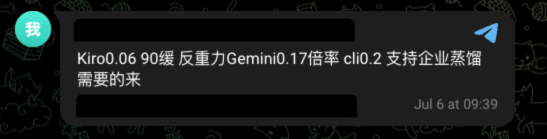
Distillation is a named product tier. Relay operators advertise their pools as distillation-capable and pitch them to enterprise buyers (Figure 1). Some run distillation-only pools with reserved capacity and a minimum spend, others advertise the reverse: “no distillation.”
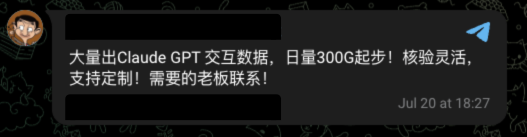
Downstream, vendors sell Claude and GPT “interaction data” at 300 gigabytes a day (Figure 2).
Kiro is one of several AI products farmed this way. Farmers go after other third-party clients that offer free-tier access to frontier models in the same way. I also see indications of paid accounts being farmed with stolen credit card details.
Inconsistencies in the forgery
To evade detection the tool picks each fingerprint value at random from a pool, resulting in hundreds of millions of possible combinations. Each account claims to be Chrome on Windows in its User-Agent, with a version picked at random from 137 to 146. But some of those values are inconsistent with the real Chrome it claims to be, each in its own way: some are impossible on their own, some are only wrong in context, and some add randomization where a real Chrome does not.
One of the fields it randomizes is a math calculation: the sine, cosine and tangent of a single fixed number. I pulled FWCIM’s own collection out of AWS’s live script. It takes sin, cos and tan of one constant:
// AWS app.js (minified, deobfuscated) - FWCIM's real math collection
math: { sin: ""+Math.sin(CONSTANT), cos: ""+Math.cos(CONSTANT), tan: ""+Math.tan(CONSTANT) }  // CONSTANT = -1e300
The tool picks this result randomly from a list of ten options:
// browser-identity.ts - ten "random" options for sin/cos/tan(-1e300)
const MATH_POOL = [
  { sin: '0.8178819121159085', cos: '-0.5753861119575491', tan: '-1.4214488238747245' }, // what Chrome (V8) returns for sin/cos/tan(-1e300), verified
  { sin: '0.8178819121159085', cos: '-0.5765775004286854', tan: '-1.4214488238747245' }, // impossible: sin²+cos² = 1.00137
  { sin: '0.8178819121159083', cos: '-0.5753861119575489', tan: '-1.4214488238747243' }, // last digits changed, not what the V8 build I tested returns
  { sin: '0.8178819121159084', cos: '-0.5765775004286855', tan: '-1.4214488238747244' }, // impossible: sin²+cos² = 1.00137
  // ...10 rows total: 1 real, 4 arithmetically impossible, 5 last-digit perturbations
]
Chrome computes this in its own bundled math library rather than the operating system’s, so a given Chrome version should return the same triple on every machine. I ran -1e300 through V8 and only the first row matched.
Four of the rows are arithmetically impossible. A real sine and cosine of the same angle satisfy sin² + cos² = 1, but in these rows the squares sum to 1.0013724361669656.
Another field it picks randomly is the graphics card, which the browser reports as a string of text. On recent Chrome on Windows, that string includes the card’s hardware ID, a short hex code like (0x00002206). The tool picks its card from a pool of twenty-two hardcoded strings, and twenty-one of them have that code missing. The Chrome it claims to be reports an RTX 3080 as ANGLE (NVIDIA, NVIDIA GeForce RTX 3080 (0x00002206) Direct3D11 ...), while the tool reports the same line without the code. So here again, nearly all account creation requests have a value the Windows Chrome they claim to be would not report.
// browser-identity.ts - GPU_CONFIGS (excerpt)
{ model: 'ANGLE (Intel, Intel(R) Iris(R) Xe Graphics (0x000046A6) Direct3D11 ...)' }, // 1/22 has the device ID
{ model: 'ANGLE (NVIDIA, NVIDIA GeForce RTX 3080 Direct3D11 ...)' },                  // no (0x....)
{ model: 'ANGLE (AMD, AMD Radeon RX 580 Direct3D11 ...)' },                            // no (0x....)
The tool randomizes one more field, and this one should not vary at all. Chrome froze navigator.plugins years ago to a fixed list of five PDF entries in a fixed order, so a default Chrome lists the plugins in the same order on every machine. The tool has that exact list but shuffles it per account:
// browser-identity.ts - Chrome's frozen 5-entry plugin list, shuffled per account
const plugins = shuffle([...PLUGINS_POOL])
Fabricated behavior
The tool also fabricates behavior. FWCIM records mouse and keyboard activity, so the tool invents it: click coordinates, key-press intervals, and time spent on each page. The values come from fixed generator ranges, and some are constants. The click it reports on the email field always ends in .5:
// fingerprint.ts - fabricated email-field click
mouseClickPositions: [`${100 + randInt(151)}.5,${10 + randInt(11)}.5`]
Two of the time-on-page values are hardcoded: exactly 38 milliseconds on page load and exactly 45 seconds on email verification, the same on every account.
Every one of these signals has the same origin: the tool inventing values it never measured, from a handful of fixed lists and formulas a real Chrome does not use. On its own each can be fixed. But getting them all right consistently, while drawing randomly from independent short lists to fabricate diverse fingerprints, is difficult.
Signals at use-time
Using the created accounts at scale is another place where the tool gives off inconsistent signals, in the traffic the relay sends to AWS.
The User-Agent is assembled from the machine the relay runs on:
// kiroApi.ts - the use-time user-agent is built from the host
const OS_PLATFORM = process.platform === 'win32' ? 'win32' : process.platform === 'darwin' ? 'macos' : 'linux'
const OS_RELEASE = require('os').release()
// aws-sdk-js/1.0.34 ... os/${OS_PLATFORM}#${OS_RELEASE} ... md/nodejs#${NODE_VERSION} ... KiroIDE-0.12.155-${machineId}
A pool running on one Linux server reports os/linux#<the same kernel> and the same Node version on every account, though each account was created as a Windows machine at signup. Each account is assigned its own machine ID, and the tool manages these to avoid device bans. But those distinct IDs share one operating system, one Node version, and usually one exit IP, resulting in many machine IDs sending requests from a single address with identical environment strings.
What this means for defenders
The tool leaves two different types of signals that can help detect it:
Catch the inconsistencies, then link from them. The fabricated fingerprint values are inconsistent. Some are impossible on their own: the sin/cos/tan triples fail sin² + cos² = 1 on four of the ten options. Others are only wrong in context: the GPU string omits the device ID its claimed Chrome version would include. These are cheap to check, and from one caught account you can follow the operator across the rest of the accounts through patterns like e-mail names and use-time IPs. These mistakes are individually cheap for the operator to fix, which is what makes the next signal a more durable one.
Link on what costs money to vary. A careful attacker can fix the specific inconsistencies above. One way to do that is to stop inventing fingerprints and replay ones harvested from real browsers. What that would not change is what the fleet shares because it costs money to keep distinct. The exit IP is an example. At signup a cheap rotating residential exit does the job. At use-time, rotating IPs would stand out. The alternative is a static residential IP for every account, and those have a fixed cost per IP, so the bill grows with every account added. So the relay runs many accounts through a few shared IPs, and AWS sees many accounts sending requests from the same handful of addresses.
The same logic covers the operator’s email domains and the batches the accounts are made in. This is the part of the operation the attacker cannot change without affecting their economics, even when it replays consistent browser fingerprints.
The tool also highlights a broader category of abuse defenders should be aware of:
Check your partner integrations. You can secure your own signup, but if your product is also reachable through a partner’s client, that client’s checks are the ones that get tested.